
TL;DR
AI turns meeting notes from a bottleneck into an automated process, handling transcripts, summaries, action items, audio-synced notes, and searchable archives. Tools either join calls as a visible bot or capture audio bot-free from your device, which suits client calls and in-person meetings alike.
We compare Goodnotes, Fathom, Otter, Granola, and tl;dv, breaking down key features, pros, cons, and pricing. For a bot-free assistant that pairs AI summaries and action items with handwritten notes, Goodnotes is the most versatile pick.
From preparing the agenda beforehand to ensuring your notes are ready to send to your colleagues, reliable meeting notes take considerable time. But often, time is precisely what you don’t have.
The good news is that AI can enhance your meeting notes, saving you both the time and effort that make them a bottleneck in your workflow. By implementing AI in your note-taking process, you’re able to distill hours-long client calls into key takeaways, action items, and next steps.
In this article, we’re giving you a deeper look into how AI enhances your meeting note process, along with the five best AI meeting note-takers to choose from.
How can AI enhance meeting notes
AI can enhance meeting notes by automatically transcribing, structuring, and extracting insights from your meeting, contextualizing your notes while making them both clear and comprehensive. This ensures your meeting notes are not only a reliable record for you, but can also be used by others in the organization.
Here’s a deeper look at the exact ways AI enhances your meeting notes:
- Full recording and transcript: AI automatically records your meeting and gives you a word-for-word transcript (typically 90-95% accuracy in English) so you know exactly who said what, at the exact second they said it.
- Summaries and automated notes: From the meeting content transcript, AI can identify key points and distill them into a bullet-point summary, giving you key takeaways at a glance.
- Action items: AI picks out tasks mentioned in discussions along with who’s responsible for them, aligning each owner to a deadline in a neat to-do list.
- Contextualized audio sync: Many AI tools will link a timestamp or sync audio to your notes, letting you go back and replay that exact moment of the recording.
- Searchable archive: AI tools make organizing your notes from past meetings easy by sorting them by topic, project, or date. You can find your notes from months ago instead of digging through folders.
On-call vs bot-free AI note-taking: What’s the difference?
There are two main ways AI note-takers for meetings work. On-call, or bot, AI note-takers join your meeting as a participant after you link your calendar. Once accepted to the call by the meeting host, they’ll start recording. ,
Bot-free note-takers capture audio from your device, meaning they don’t join the call as participants at all—they record from the sidelines. This means they can also work for in-person meetings and don’t need to sync with any conferencing platform.
TABLE HERE
5 AI note-takers for AI-generated notes
While AI can certainly streamline and enhance your meeting notes when running client meetings, not all tools offer the same features. You need to evaluate and select depending on your priorities and workflow.
Here’s an overview of the top five, including key features, pros, cons, and pricing.
Goodnotes
Goodnotes is a comprehensive note-taking experience that offers the features you need to create and share better meeting notes. Meeting AI allows you to record and transcribe meetings (via device audio, not an on-call bot), take time-stamp-synced notes, get automated summaries and key takeaways, and share meeting notes with others across your organization. You can even chat with your meeting notes using Ask Goodnotes to get precise details in seconds.
Alongside this AI meeting support, Goodnotes gives professionals a workspace for all note-taking, PDF markup, text documents, and more. Built for iPad—but powerful across devices—Goodnotes makes knowledge collection, management, and sharing easier for individuals and teams alike.
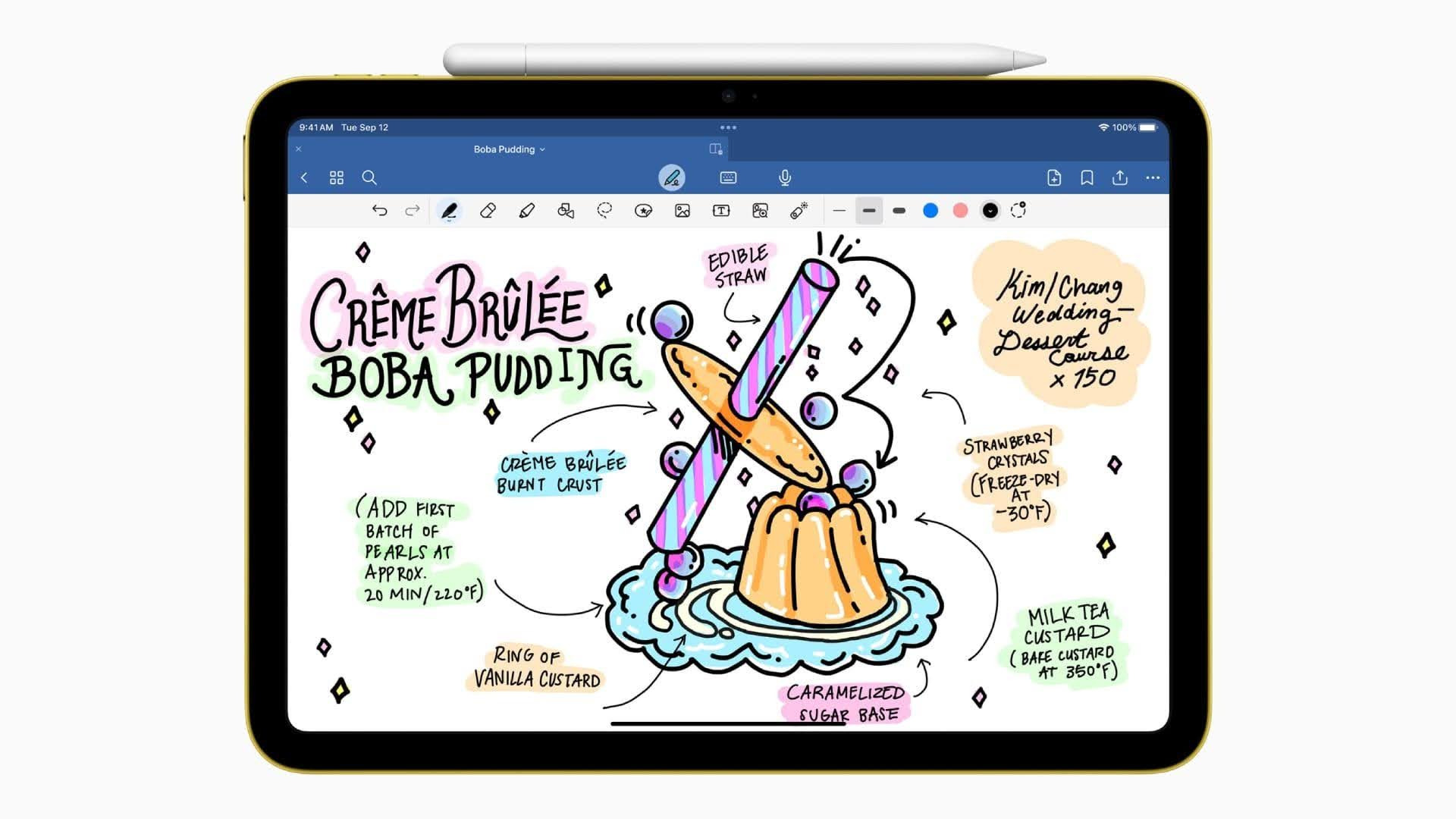
Key features:
- Audio recording: Automatically records meetings from your device's mic and saves the full transcript in your notebook.
- Audio-synced notes: Tap on the notes you took during a meeting and jump to the timestamp at which you took them.
- Goodnotes AI: Goodnotes Meeting AI transcribes, summarizes, and pulls out action items once the call ends. Live Summary lets you catch up if you get distracted, and Enhance Notes merges the transcript with what you wrote by hand.
- Team collaboration: Automatically get a new notebook for each meeting with the title, time, and attendees filled in beforehand. You can then share the recap with the right people, or export the notebook for the whole team.
- Meeting notes organization: Search your notes through a library of nested folders. Quickly access notebooks with Goodnotes’ advanced search covering handwriting, typed text, PDFs, and transcripts.
- Other tools: Goodnotes doesn’t stop at meeting notes. Use Whiteboards to brainstorm with your team, create Text Documents when drafting something more formal, and annotate PDFs with speedy import and markup tools. Notes sync across iPad, iPhone, Mac, Windows, Android, and web.
- Ask Goodnotes: Ask specific questions about your notes content and get answers paired with page references from your notebooks.
Pricing
Goodnotes offers a free-forever plan that includes up to three Notebooks, Text Documents, and Whiteboards. This includes all note-taking tools and offers 20 minutes of audio recording.
Paid plans start with Essential at $11.99/year, which includes unlimited audio recordings and limited AI features. Full AI capabilities can be added to this plan for $9.99/month. Alternatively, meeting AI and AI create mode are included in the Pro plan at $35.99/year.
Teams looking for organization-wide availability and enterprise-focused controls and security can opt for the Teams plan at $120 per seat/year or the Enterprise plan with custom pricing.
Fathom
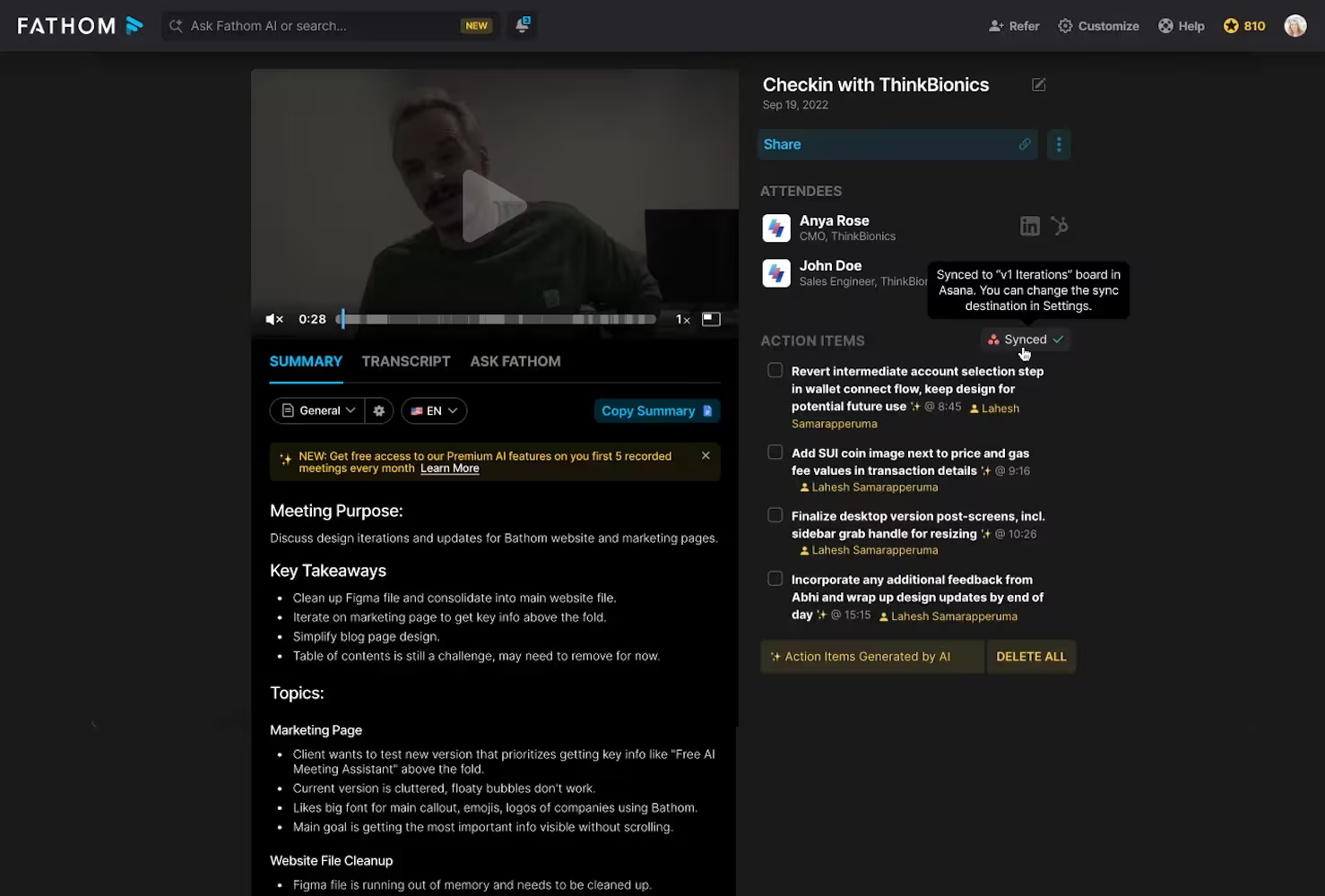
Fathom is an AI meeting assistant tool that offers unlimited recordings and transcriptions in its free plan. While primarily an AI bot for calls, users will soon be able to choose between bot or bot-free captures, with the latter option still in beta.
Each call produces an instant summary, searchable transcript, and action items. The paid plan allows users to ask Fathom questions about meetings to get specific, detailed information on the go.
Key features:
- Automated recording and transcription: Get recordings and transcriptions of your meetings the moment they finish, complete with speaker labels.
- Generate summaries and action items: Condense meeting transcripts into a few bullet-point notes and identify the owner of each action item.
- Ask Fathom AI search: Ask Fathom’s AI specific meeting questions, and it surfaces answers from your transcript.
- CRM automation: Eliminate manual data entry by automatically syncing meeting data with your CRM. Fathom integrates with Salesforce and HubSpot.
Pricing
Fathom offers a free plan with unlimited recordings and instant call summaries as standout features. By paying $19 per month/user for the Teams plan, you gain access to Fathom’s conversational AI meeting assistant and playlists of highlights from meetings.
With Fathom’s $34 per month/user Business plan, teams can use Coaching metrics and AI scorecards and advanced custom summaries. With Fathom’s custom Enterprise plan, you gain access to organization-wide security controls, SSO & SCIM provisioning, and custom data retention programs.
Otter AI
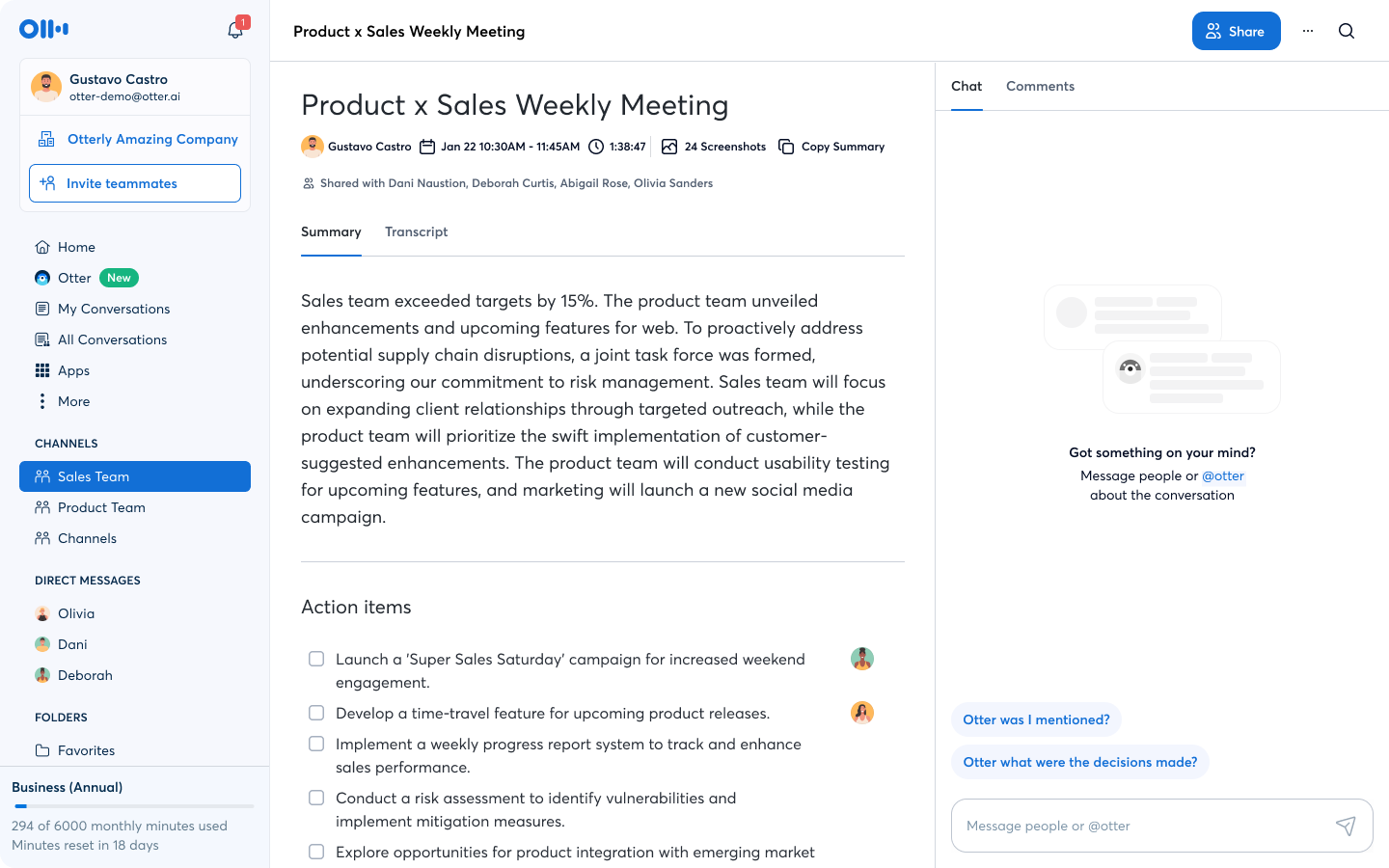
Otter AI is designed to transcribe your meetings and turn them into a searchable knowledge base. Its AI notetaker automatically joins meetings once synced up with your calendar, but it also offers a desktop app for Mac and Windows. Alongside multi-language and speaker recognition, it's also known for its AI chat, which answers questions across meetings.
Key features:
- Automated bot capture: Join meetings through Otter’s AI bot and get a transcription and recording afterward. Otter AI can even join multiple meetings at once.
- Streaming real-time transcription: Otter also displays your transcription on screen as spoken, letting you highlight key moments and tag crucial speakers.
- Screenshotting visuals: Automatically take high-resolution screenshots whenever speakers share their screen.
- Role-specific AI agents: Otter offers automated role-specific AI agents for workflows, including sales, recruiting, and education media agents.
Pricing
Otter AI offers a free Basic plan with 300 monthly transcription minutes, live transcription, and speaker identification, designed for Zoom, Teams, and Google Meet. Pro starts at $16.99 per month/user, and gives you 1,200 recording minutes, advanced AI workflows, and meeting templates.
Teams needing unlimited meetings and longer sessions can choose Business at $24 per month/user, while Enterprise offers custom pricing with SSO and enhanced security.
Granola
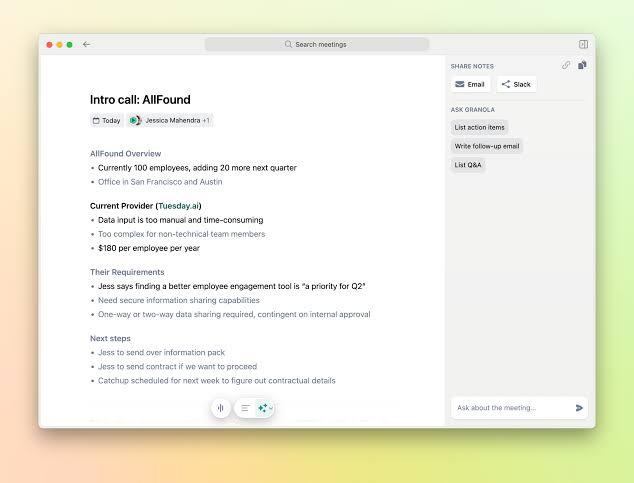
Granola is an AI-powered notepad made for meetings. It records your device’s audio while you take notes manually. At the same time, its AI reads the meeting context and fleshes out your shorthand into shareable, ready-to-use meeting notes. Its built-in AI chat answers questions and acts as a second brain.
Key features:
- Human-in-the-loop enhancement: Take down minimal keywords or phrases from the meeting. Granola uses these as steering prompts, cross-references them with the transcription, and contextualizes your notes while adding key information.
- Device-level capture: Take extensive notes during meetings without a bot joining. Instead, let Granola capture audio from your microphone.
- Interactive AI recipes and chats: Use Granola’s conversational style chat to ask questions and get answers about your meetings. Micro prompts or ‘recipes’ let you get highly specific output, like drafting a client email.
- Specialized templates: Assign specific note-taking templates and structures based on the meeting type, such as investor meetings, sales and discovery calls, or product sprints.
Pricing
Granola has a free Basic plan, covering AI meeting notes, AI chat across meetings, and customizable templates. However, there’s a cap on meeting history. The Business plan is $14 per month/user, and gives you unlimited notes and history alongside advanced chat features.
Larger teams can choose Enterprise at $35 per month/user, which adds SSO, admin controls, and org-wide data deletion settings.
tl;dv
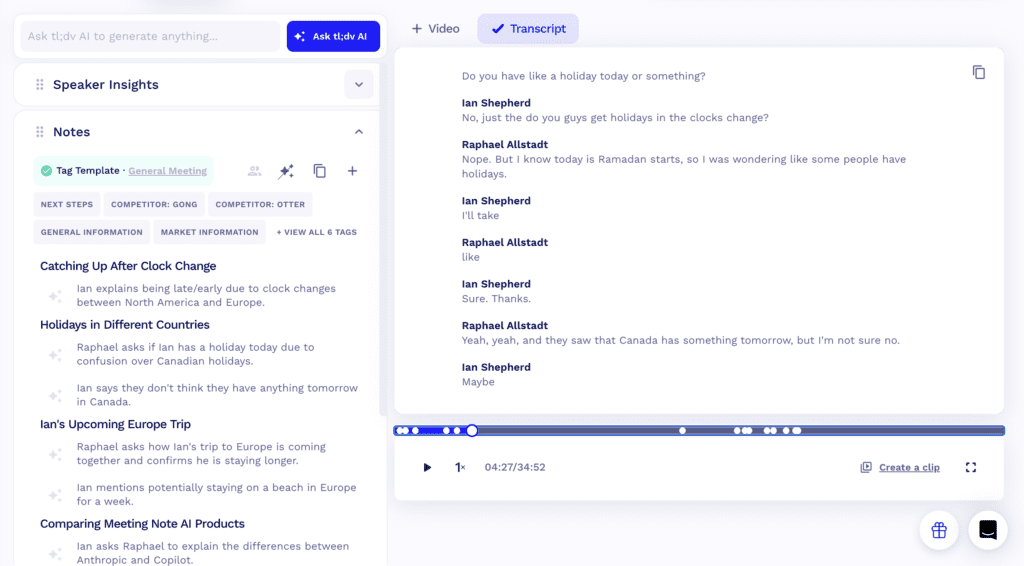
tl;dv is an AI notetaker that generates a video recording, transcript, and shareable summary after each call. What stands out is tl;dv’s ability to draft follow-up emails, log email notes in your CRM, and analyze your insights across meetings. tl;dv was specifically designed for Zoom, Google Meet, and Microsoft Teams when recording meetings with a bot, but also offers a bot-free desktop app that captures system audio through your device.
Key features:
- High-quality video-first recording: Get high-resolution recordings of your meetings. Instead of reading a script, tl;dv indexes each call to visual timelines so you can skip to conversational milestones.
- Live ‘pinning’ and timestamps: Click on the ‘pin’ option to mark a crucial moment during meetings. You can add a manual note to the pin or automatically send a clip of the highlight to a colleague on Slack.
- AI workspace: Ask tl;dv’s AI chat to answer specific questions about a meeting, or execute bulk searches across multiple folders and get synthesized answers.
- Multi-meeting intelligence reports: Get trends, aggregate feature requests, and send an automatic weekly digest. tl;dv analyzes historic data to surface insights for your team.
Pricing
tl;dv offers a Free plan with unlimited video recordings and transcription in over 30 languages. However, AI notes and Ask AI queries are capped at 10 each. Pro is $29 per month/seat and gives you unlimited AI notes, custom templates, and email follow-up drafts.
A Business plan costs $39 per month/seat and adds multi-meeting AI insights, scheduled reports, and team-wide automations, while Enterprise offers custom pricing with SCIM provisioning, custom SSO, and privately hosted AI.
Get AI meeting notes and streamline your client calls
When settling on an AI meeting notes tool, make sure to choose an option that fits your workflow:
- Choose Goodnotes if you often work on iPad and want a bot-free meeting assistant, combined with a versatile stylus-based note-taking experience.
- Choose Fathom if you want a generous free plan for recording, transcribing, and summarizing your calls, and don’t mind a bot joining your call.
- Choose Otter if your main needs are live transcriptions across meeting platforms, plus you need integrations with tools like Salesforce and HubSpot.
- Choose Granola if you want customizable templates that fit around your call structure without a bot joining.
- Choose tl;dv if you want ample free video recordings and want to send clips to your colleagues.
Of all the AI meeting notes tools, Goodnotes is the most versatile, offering note-taking alongside AI meeting notes. With its AI-powered features, Goodnotes captures audio through your device’s microphone, meaning it works with any video conferencing platform or in-person meeting.
If you want AI meeting notes that stay bot-free, sit alongside your handwritten notes, and live in the same place as your documents and whiteboards, try Goodnotes.
FAQs
1. Can AI take notes at a meeting?
Yes! AI meeting notes tools and assistance tools can both record and transcribe your call and turn it into a clear summary with key points and action items. Some tools join as a bot, while others record through your device’s audio instead.
2. What is the best free meeting notes app?
Goodnotes is the best free option if you want more than a transcript. Its free-forever plan includes up to three Notebooks, Text Documents, and Whiteboards, all basic note-taking tools, and 20 minutes of audio recording, so you can type or handwrite your notes right alongside the recording.
Another great free option is Fathom because it offers a generous Free plan with unlimited recordings and no meeting cap.
3. What’s the easiest way to take notes in a meeting?
The easiest way to take notes in a meeting is to write shorthand notes and bullet points while letting AI record and transcribe the entire meeting. Through an AI-powered notetaker tool, you can then use AI to summarize key points and action items. A tool like Goodnotes will even help by syncing your written notes to the exact moment in the transcript.