TL;DR
- What we compare: How Goodnotes AI and Notion AI handle meetings, shared notebooks, planning, admin, and price for teams.
- Where Goodnotes leads: Handwriting, PDF markup, whiteboards, and in-room meetings, with AI that reads all of it.
- Where Notion leads: Typed wikis, databases, and AI search across apps like Slack and Google Drive.
- You don’t have to choose: Brainstorm and take notes in Goodnotes, then track the follow-ups in Notion.
Both Goodnotes and Notion now come with built-in AI that can summarize meetings, answer questions about notes, and help plan the next step. If you’re choosing a tool for your team, you’ll want to know where that AI helps most, plus how each app handles shared documents and notes, admin, and price.
Let’s look at where each one fits, so you can picture how your own team would use it.
Goodnotes vs Notion for teams at a glance
Meeting notes and follow-ups
Both apps can record, transcribe, and summarize a meeting. The difference is what happens to the notes afterward.
Goodnotes keeps the AI notes next to your own
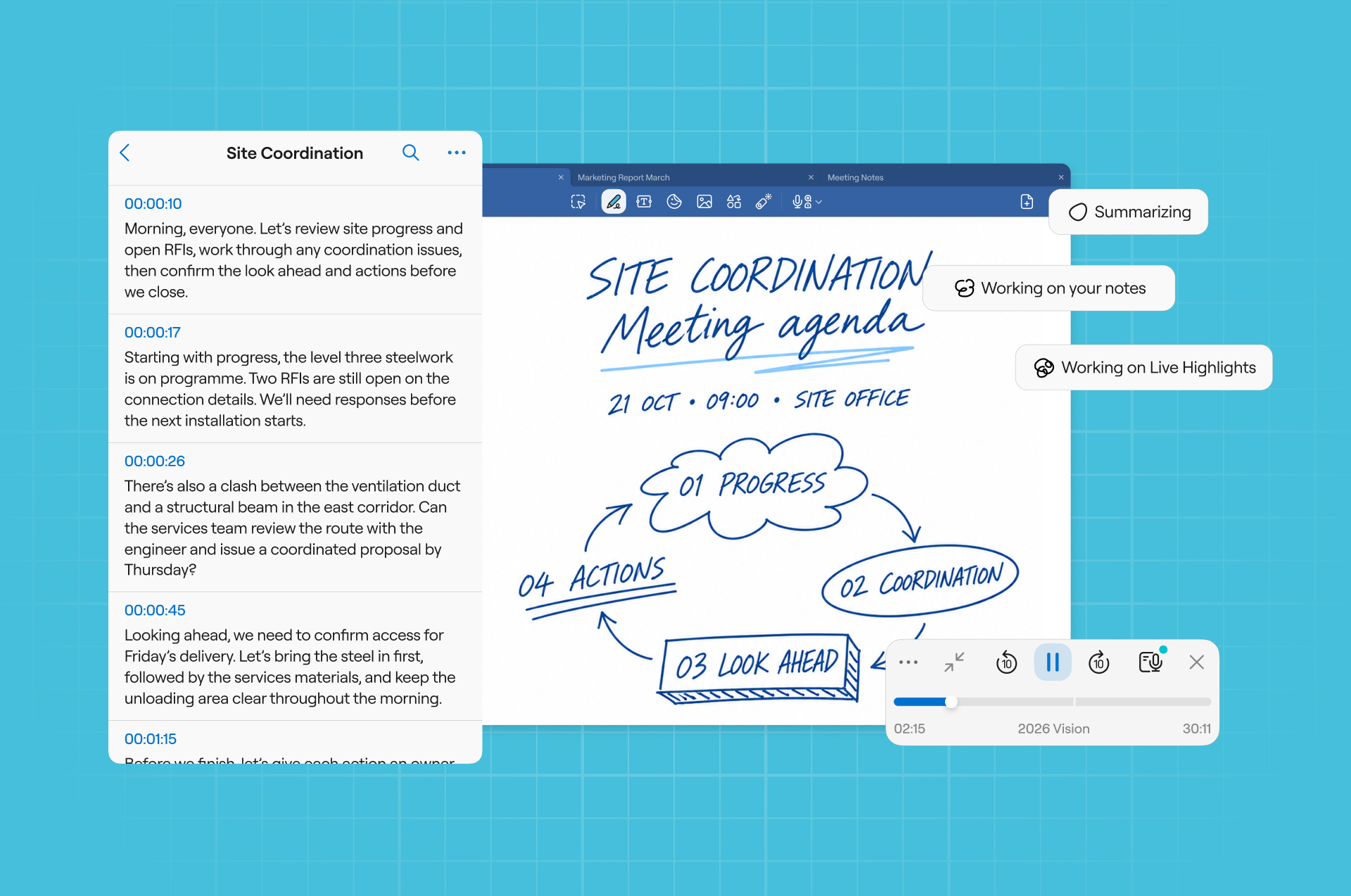
Goodnotes AI for Meetings records, transcribes, and summarizes your meeting, then pulls out action items. It works with Zoom, Microsoft Teams, Google Meet, or people talking around a table.
You can also connect Google Calendar, Outlook, or Apple Calendar, and Goodnotes sets up a note for each meeting, with the title, time, and attendees already filled in. The generated notes land below whatever you wrote or sketched during the meeting, so your own notes stay intact. Goodnotes can record meetings that run up to three hours.
Notion turns meetings into pages
Notion’s AI Meeting Notes come with the Business and Enterprise plans. Type /meet on any page in the desktop app to start. Start transcribing, and when you stop, Notion picks out the key points and action items. It also works in the browser and mobile app, but those only pick up your mic so they suit in-person meetings best.
You can then file your meetings notes into one database, next to the tasks and projects your team already tracks there.
Verdict: If your meetings happen at desks and the follow-ups live in a tracker, Notion fits well. If they happen in meeting rooms or on site with an iPad and stylus, Goodnotes keeps your handwritten notes and in the AI notes on the same page.
Shared project notebooks
Both apps let a team work on the same document at the same time. All that differs is the type of document.
Goodnotes shares the page itself
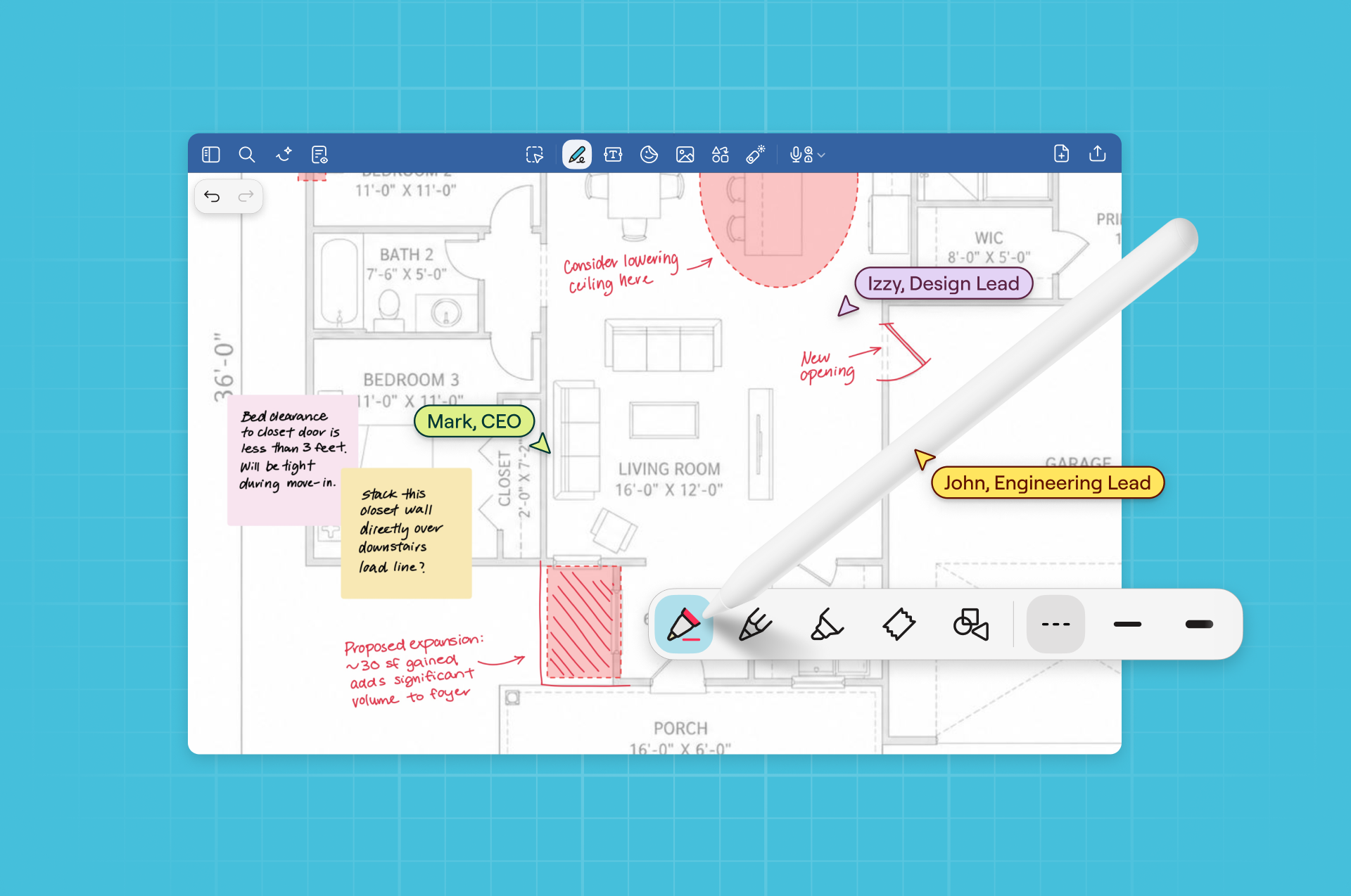
With real-time collaboration, up to 50 people can work live in the same notebook, whiteboard, or text document, each with their own Live Cursor. More people can join beyond that, and they get regular syncing instead of instant updates.
Your team can comment on the page, add sticky notes, and mark up the same PDF or drawing. Owners control who can view or edit through private, encrypted links.
This matters most when the document isn’t plain text. Think of a site plan with redlines from three people, or a contract with notes in the margins. Everyone works on the original file instead of passing screenshots around.
On Teams and Enterprise, Goodnotes connects to Google Drive, OneDrive, Dropbox, and Box. You can open a file from your company’s storage and annotate it without downloading a copy first. On iOS devices you can save it straight back; on other devices, you export the file and upload it again. OneDrive for Business, Dropbox, and Box are only on the Teams and Enterprise plans.
Notion shares the entire workspace
In Notion, everyone with access can edit a page together, and you can see who’s on it and where. Access levels run from Full access down to Can view. New pages take on the access of the page or teamspace they sit in. The Business plan adds private teamspaces and lets you limit each person to their own rows in a database.
For a team building a wiki, a handbook, or a project hub that everyone types into, that structure helps a lot. Goodnotes doesn’t try to be a database.
Verdict: Notion suits shared typed docs and wikis that need fine-grained permissions. Goodnotes suit the PDFs, drawings, and handwritten pages your whole team marks up together.
Brainstorming and planning
Planning has two halves. There’s the looser part, where a team throws ideas at a wall. Then there’s the tidy part, where those ideas become owners, dates, and status updates. Each app is built for a different half.
Goodnotes gives the team a whiteboard and an AI that draws

The Goodnotes Whiteboard is an infinite canvas for mind maps, flowcharts, and stick-note sessions. The whole team can work on it live.
Create Mode lets Goodnotes AI add to the page for you. Ask it to turn a list of ideas into a flowchart, a mind map, or a timeline, and you get a diagram you can still edit by hand. It can also sum up a session’s key takeaways on a new page, or as a visual summary.
For a deeper look at running a session, see our guide to collaborative planning workspaces.
Notion turns the plan into a system
Notion’s databases handle the tidy half. Subtasks, dependencies, charts, dashboards, and automations all live there. Notion Agent can take on multi-step tasks using context from your workspace, your connected apps, and the web.
Notion’s Custom Agents, which run repeat tasks on their own, cost extra. After a free trial, they use credits sold on top of the seat price, at $10 per 1,000 credits a month.
Verdict: Goodnotes is stronger at the loose, visual start of a plan, and Notion at tracking it afterward. Many teams use both. Brainstorm in a shared Goodnotes whiteboard, agree on next steps, then move them into the team’s tracker.
Search and cross-team coordination
As the team grows, people need to find what another team decided, and it often lives in a different app.
Goodnotes searches everything you’ve written

Goodnotes search covers your whole library, including handwriting, typed text, scanned documents, and PDFs. So a note scribbled in a client meeting six months ago is still searchable.
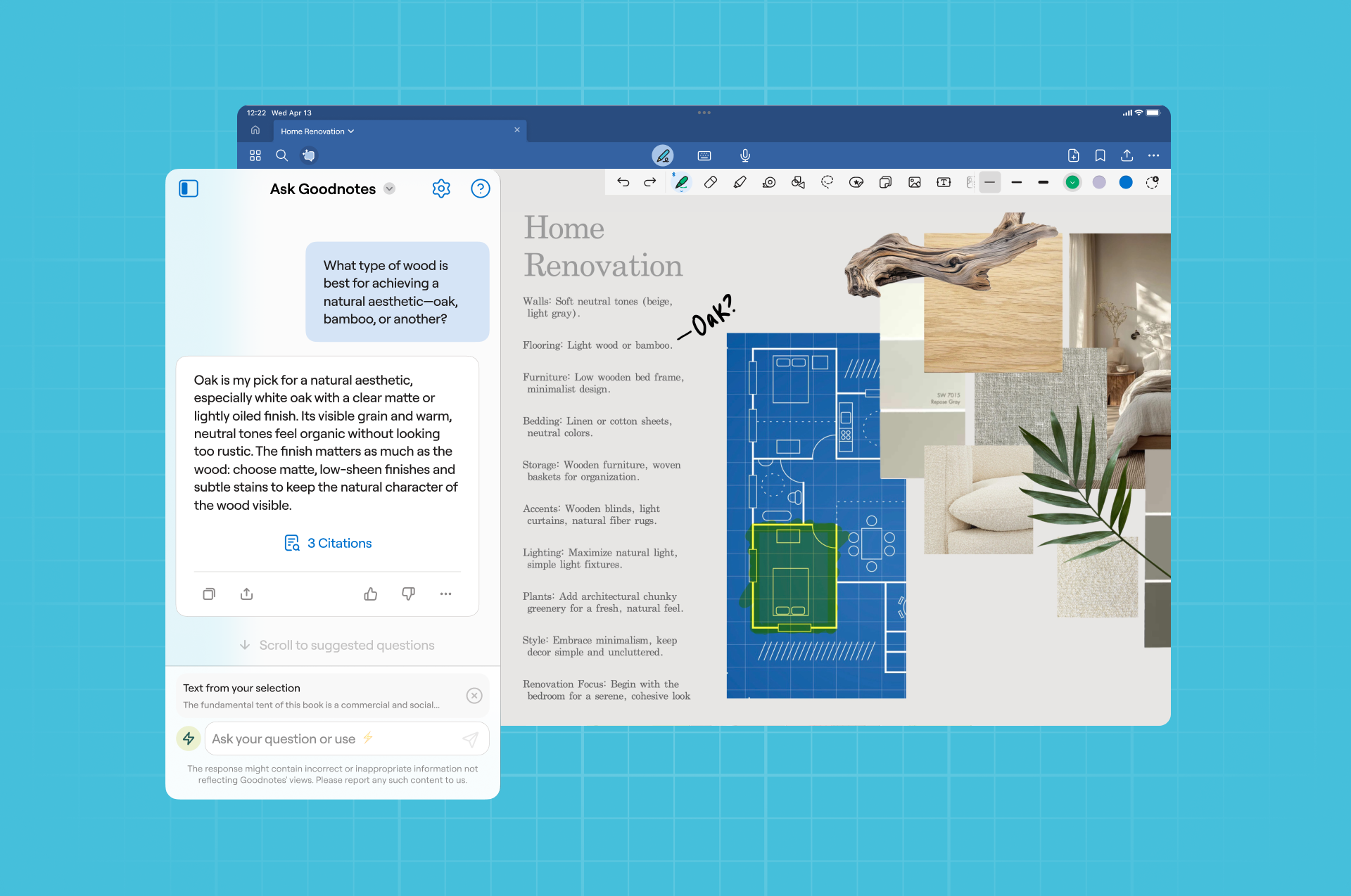
Goodnotes AI works on the document you have open. Ask it to summarize a notebook or answer a question and it replies with links back to the page it drew from. It can also translate your notes, which helps when a team works across languages.
Notion searches beyond Notion
This is Notion’s strength for larger teams. On Business and Enterprise, Enterprise Search looks across your Notion workspace and connected tools like Slack, Microsoft Teams, Google Drive, SharePoint, and GitHub. Ask a question and Notion AI can answer from all of them.
Setup takes some admin work. A workspace owner with admin rights in each connected app has to switch the connectors on, and the first sync can take up to 36 hours.
Verdict: Notion is ahead on search across a company’s other apps. Goodnotes goes deeper inside your own notes, handwriting included.
Admin and security
Both Notion and Goodnotes cover the basics an IT team will ask about.
Goodnotes is SOC 2 Type 2 and ISO/IEC 27001 certified, and complies with GDPR and CCPA. Notion offers single sign-on on Business, plus automatic user provisioning (SCIM), an audit log, and data loss prevention (DLP) tools on Enterprise.
Both Goodnotes and Notion say they don’t use your data to train AI unless you explicitly opt in.
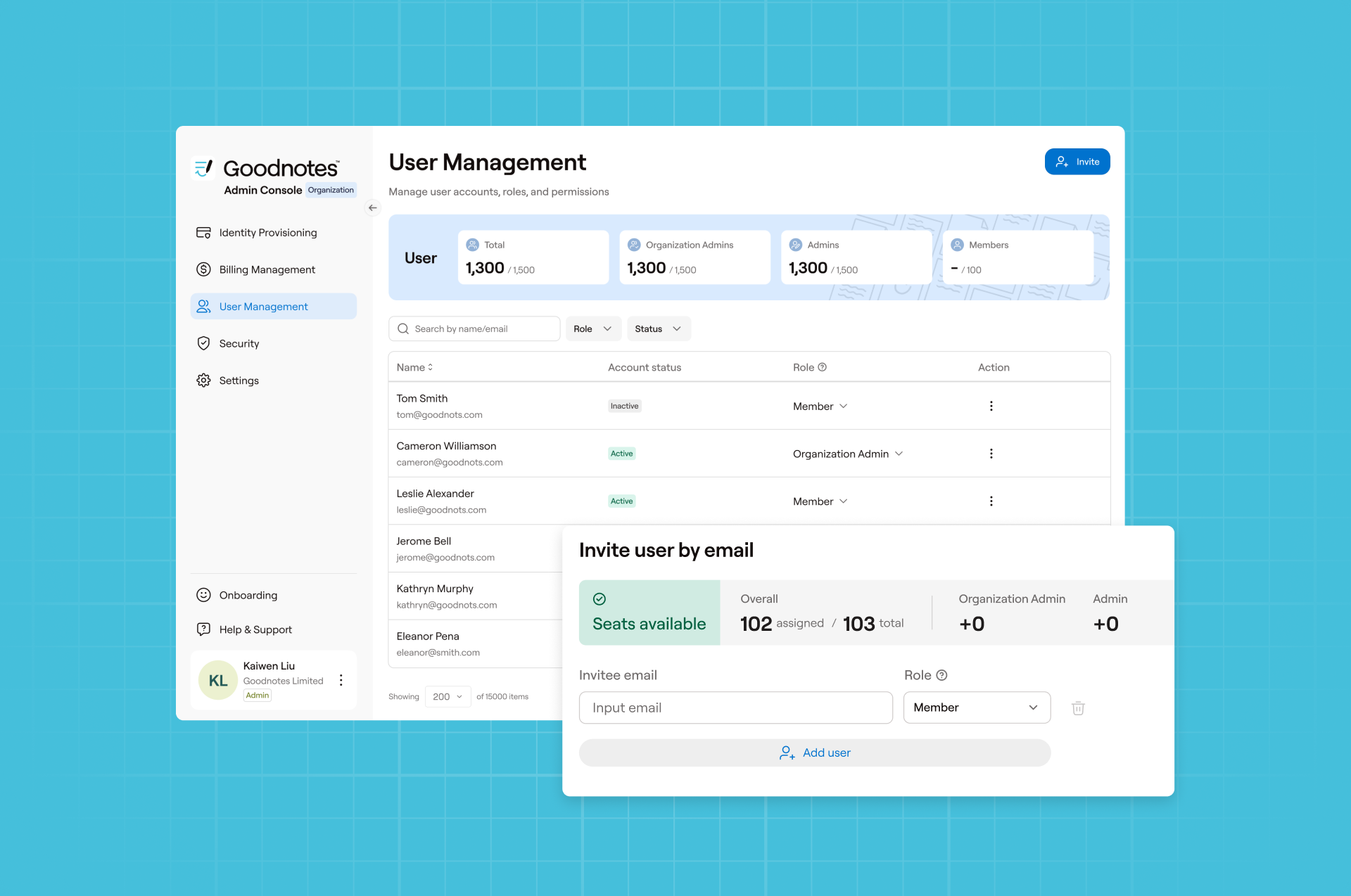
On Goodnotes Teams, the Admin Console handles users, admins, single sign-on, and billing in one place. Goodnotes Enterprise is built for teams whose notes can’t go to the cloud, running on managed iOS devices. IT activates it with a license key through device management tools like Microsoft Intune or Jamf Pro. There’s no Goodnotes account and no cloud sync, and backups go to a server you control. Notion runs in the cloud and has no equivalent.
Verdict: For deeper admin controls like an audit log and DLP, Notion Enterprise has more to offer. For notes that can’t touch the cloud, Goodnotes Enterprise is the stronger pick.
For more on how teams set this up, see our team collaboration page and the Goodnotes Trust Center.
Goodnotes vs Notion: The final verdict
You don’t have to choose one: use both apps, one for capturing ideas and one for tracking them.
Try Goodnotes with your next team meeting
The fastest way to know if Goodnotes fits is to use it on real work. Try Goodnotes for free, with a 30-day free trial. Want to learn more? Talk to our team about Enterprise, or work out what Teams would cost for your headcount.
FAQs
1. Goodnotes vs Notions, which is better for teams?
It depends on how your team works. Notion is better for teams who work in typed wikis, databases, and connected apps. Goodnotes is better for teams who work with handwriting, PDF markup, whiteboards, and meetings in the room or on site. You can also use both, with Goodnotes for capturing ideas and Notion for tracking them.
2. Which is better for team collaboration, Goodnotes AI or Notion AI?
Both support real-time team collaboration. Notion AI is better for teams who co-edit typed pages and need fine-grained permissions and AI search across other apps. Goodnotes AI is better for teams who collaborate on handwritten notes, PDFs, and whiteboards, since it reads handwriting and up to 50 people can edit one document live.
3. Can teams collaborate in real time in Goodnotes?
Yes. On Goodnotes Teams, up to 50 people can edit the same notebook, whiteboard, or text document live, each with their own Live Cursor. Your team can comment on the page, add sticky notes, and share documents through private, encrypted links.
4. What’s the best AI tool for team meeting notes?
It depends where your meetings happen. Goodnotes AI for Meetings suits in-person, on-site, and tablet meetings. It records, transcribes, and summarizes the meeting, pulls out action items, and keeps the AI notes below your own. Notion AI Meeting Notes suits video calls on desktop and files notes next to your team’s tasks.
5. What are the best AI tools for shared notebooks and collaborative planning?
For shared notebooks that mix handwriting, PDFs, and sketches, Goodnotes lets up to 50 people work live in the same notebook or whiteboard. Its AI can summarize, answer questions, translate, and turn ideas into editable diagrams. For collaborative planning in typed docs and databases, Notion pairs shared pages with Notion Agent and database tracking.
6. Can my team use Goodnotes and Notion together?
Yes. Use Goodnotes to brainstorm, take meeting notes, and mark up documents together, then add the agreed actions to your team’s tracker in Notion. Each app handles the part of the work it’s built for.
7. How much do Goodnotes and Notion cost for teams?
Goodnotes Teams costs $120 per seat per year, with a 30-day free trial and no credit card needed. Notion Business costs $20 per seat per month on yearly billing, and Custom Agents cost extra. Enterprise pricing for both is custom.
8. Is Goodnotes secure enough for enterprise use?
Goodnotes is SOC 2 Type 2 and ISO/IEC 27001 certified, and complies with GDPR and CCPA. It doesn’t use customer data to train AI. Goodnotes Enterprise can also run on-device, with no cloud sync at all.
9. Does Goodnotes work with Google Drive and OneDrive?
Yes. Goodnotes Teams and Enterprise connect to Google Drive, OneDrive (personal and business), Dropbox, and Box. You can open and annotate files without downloading them first, and save them back to your storage on iPad and iPhone.