TL;DR
- No single app does it all, so most teams pair a couple, one to control the documents and one for their own notes and markups.
- The tools split into three jobs: formal markup and redlining, running the project, and quick sketches and field notes.
- Goodnotes fits the last group, for handwritten notes, sketches, and light PDF markup kept in one place, not as a replacement for Bluebeam or Procore.
Architecture, engineering, and construction (AEC) teams have largely swapped paper drawings for tablets. Digital plans stay current, marked-up copies no longer go missing, and everyone works from the same version. The hard part is choosing the right apps.
The AEC software market is crowded, and each tool is good for different things. Some are built for formal drawing markup and redlining, while others are made for quick sketches and handwritten field notes. Few do more than one of those well.
Most teams therefore don’t rely on one app–they pair a couple, usually one to control the documents, and one to capture notes and markups on site.
Here are the best digital tools for AEC teams, whether you need heavy-duty redlining, a platform to run the job, or somewhere to sketch and take notes in the field.
What to look for
Five major features separate the tools in this list today. Decide which ones matter most for your work before you compare.
Offline access: The tool opens drawings and saves markups with no connection, then syncs later.
Markup fidelity: Handles a full drawing set at size, with measurements and clouds that hold when a new revision drops in.
Redlining depth: Call-outs, measurements, stamps, and a markup log others can follow. Most important for formal document control.
Sketch and handwriting: Freehand drawing and handwritten notes on the page.
Handoff to the office: Export, share, and version control, so the right copy is sent.
The first three favor the heavier suites and field platforms. The last two are where Note-and-sketch tools perform better in the last two criteria. Most teams need both, which is why the apps are grouped, not ranked.
Sketching, design, and handwritten field notes
For the notes and drawings that happen around the documents.
Goodnotes
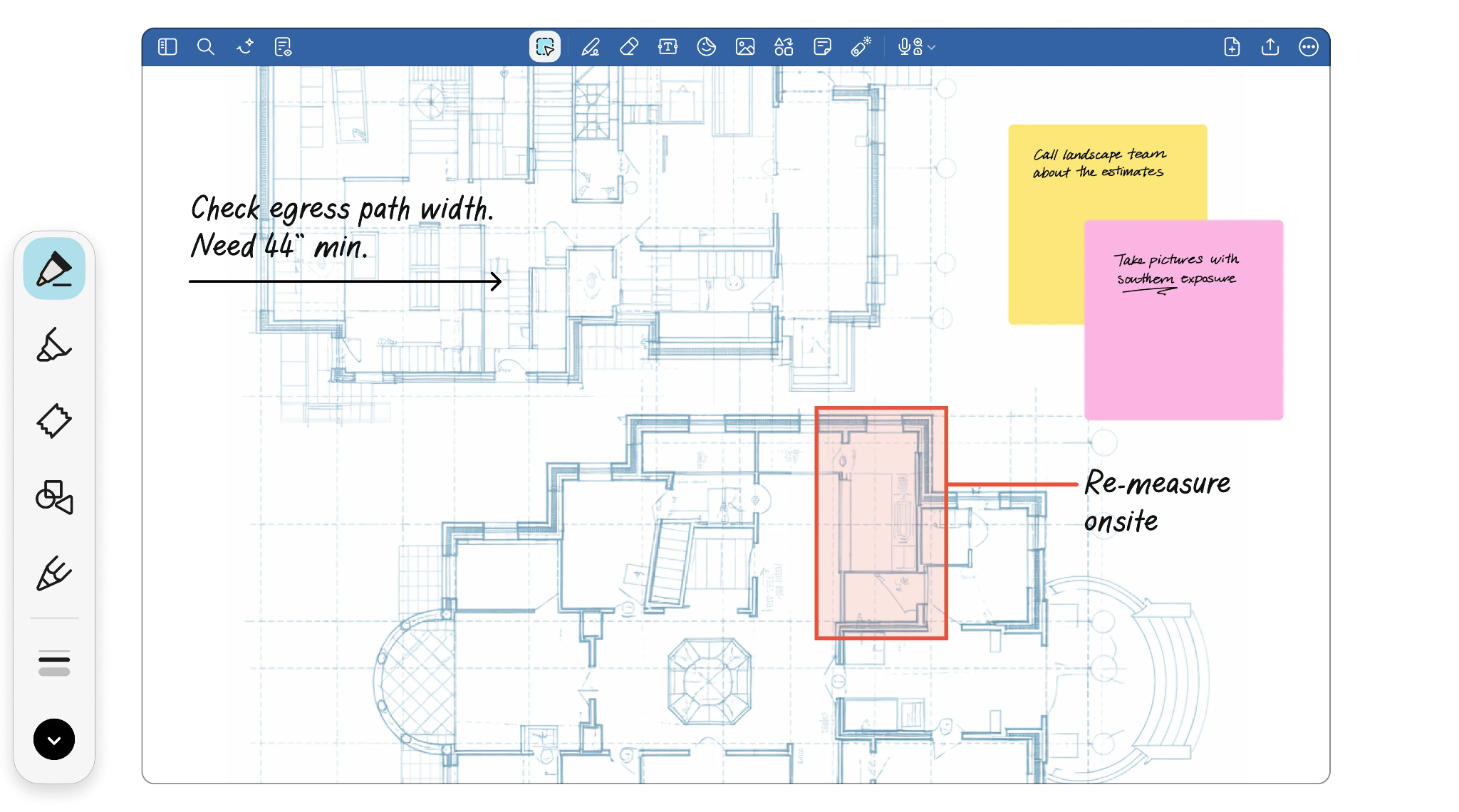
Best for: architects and engineers who want quick handwritten field notes and light markup next to everything else.
Drawbacks: not a full redlining suite or a project platform.
Goodnotes is a handwriting and note-taking app that also marks up PDFs. You import plan sets, detail sheets, and specs, then handwrite, highlight, type, and sketch straight on the page. Your handwriting stays searchable, so a note surfaces across a stack of drawings, and you can adapt templates for site inspections, daily logs, checklists, and punch lists. Notes, sketches, meeting notes, and audio site in one notebook, and it runs on iPad, Android, Windows, Mac, and web.
Morpholio Trace
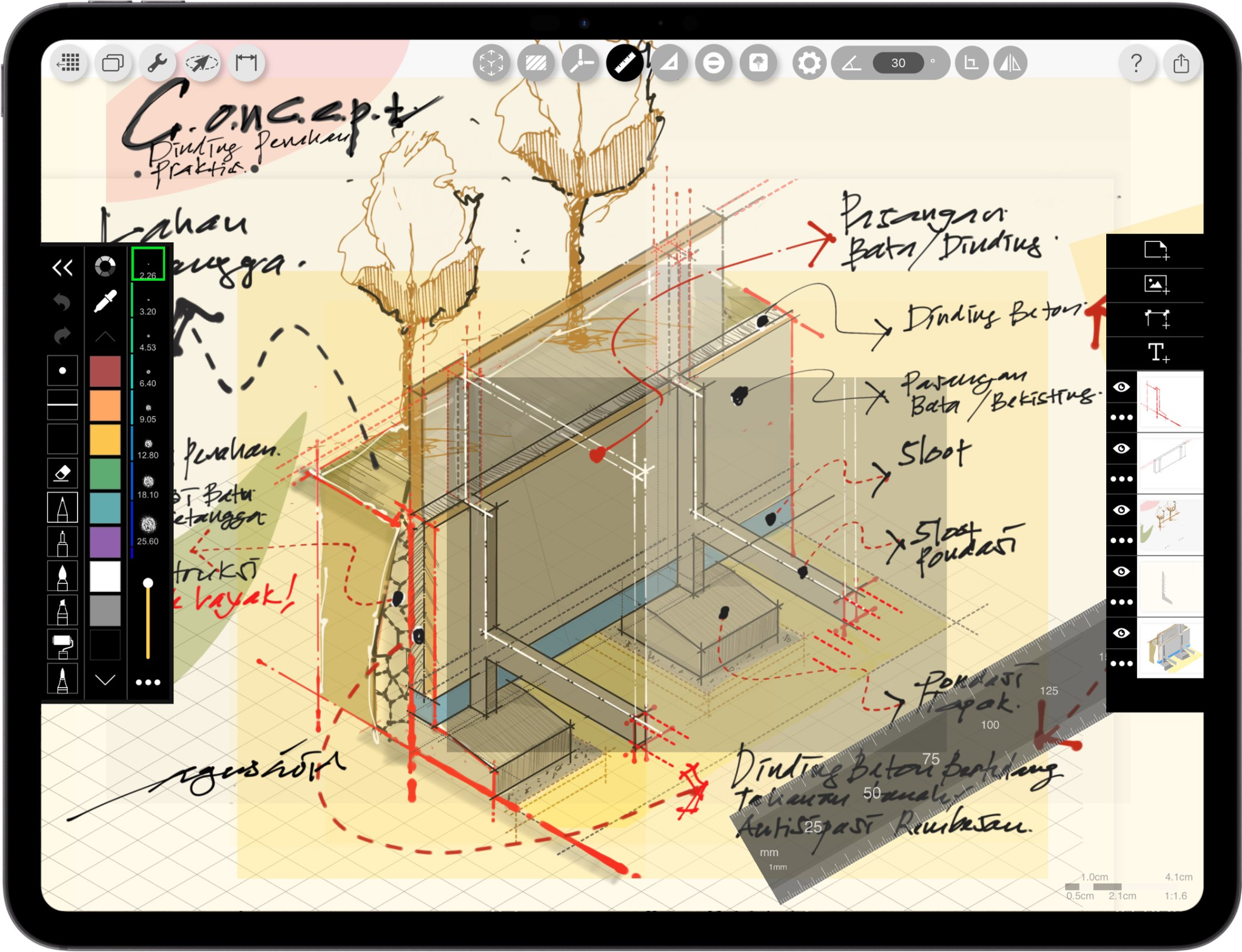
Best for: design-stage thinking and sketch overlays.
Drawbacks: iOS only, not a document-control or project tool.
Morpholio Trace acts as digital tracing paper for architects and designers. You sketch by hand in layers over photos, PDFs, maps, or LiDAR room scans, and it adds what paper can’t,like instant scale, area calculations, scale rulers, stencils, and perspective tools. It runs from concept sketching through construction-admin markup and exports to AutoCAD or Revit. It is also part of Vectorworks.
Full markup and redlining suits
For teams whose main job on site is marking up documents to a formal standard.
Bluebeam Revu
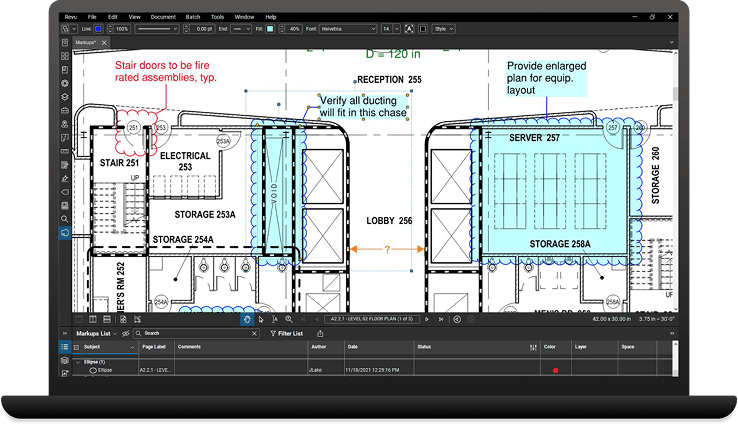
Best for: teams doing formal, high volume document markup and takeoffs.
Drawbacks: it’s a dense, desktop-first app with a learning curve and a per-seat cost.
Bluebeam Revu is considered the industry standard for PDF markup and redlining in construction. You mark up drawing sets with callouts, clouds, and custom stamps, and every change is recorded in a sortable Markups List that doubles as a record. Measurement and takeoff tools pull quantities off the sheet, and the comparison overlay flags what changed between revisions. Studio Sessions let several people mark up the same PDF at once, while Tool Chests keep markups consistent by trade. The full app runs on Windows, with Bluebeam Cloud covering web and mobile for the field.
Drawboard PDF
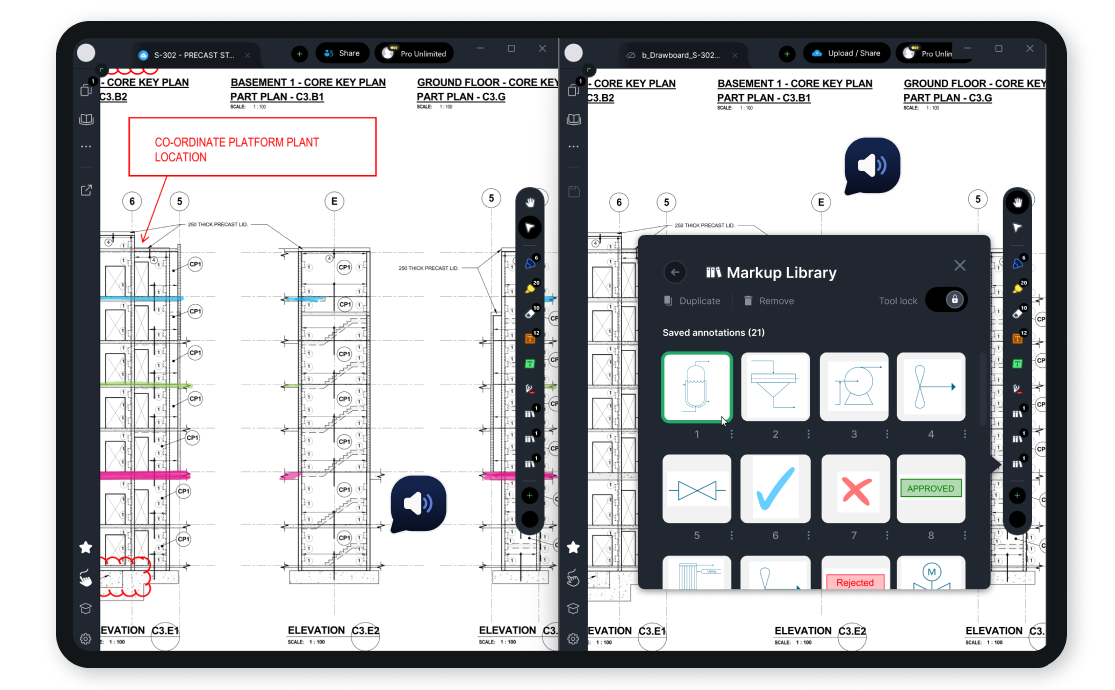
Best for: individuals and small teams who want markup features without Bluebeam’s weight or costs.
Drawbacks: fewer document control features than the bigger suites.
Drawboard PDF is a fast, pen-first PDF markup tool that feels close to ink on paper, with measurement tools you calibrate to the drawing plus callouts, shapes, and engineering grid templates. It runs on Windows, iPad, Mac, Android, and web with real-time sync. Its sister product, Drawboard Projects (formerly Bullclip), adds team document review with auto-pushed revisions and issue tracking, and connects to Procure and Autodesk.
Field and project management platforms
For teams who need the markup to live inside a wider system that runs the project.
Fieldwire by Hilti
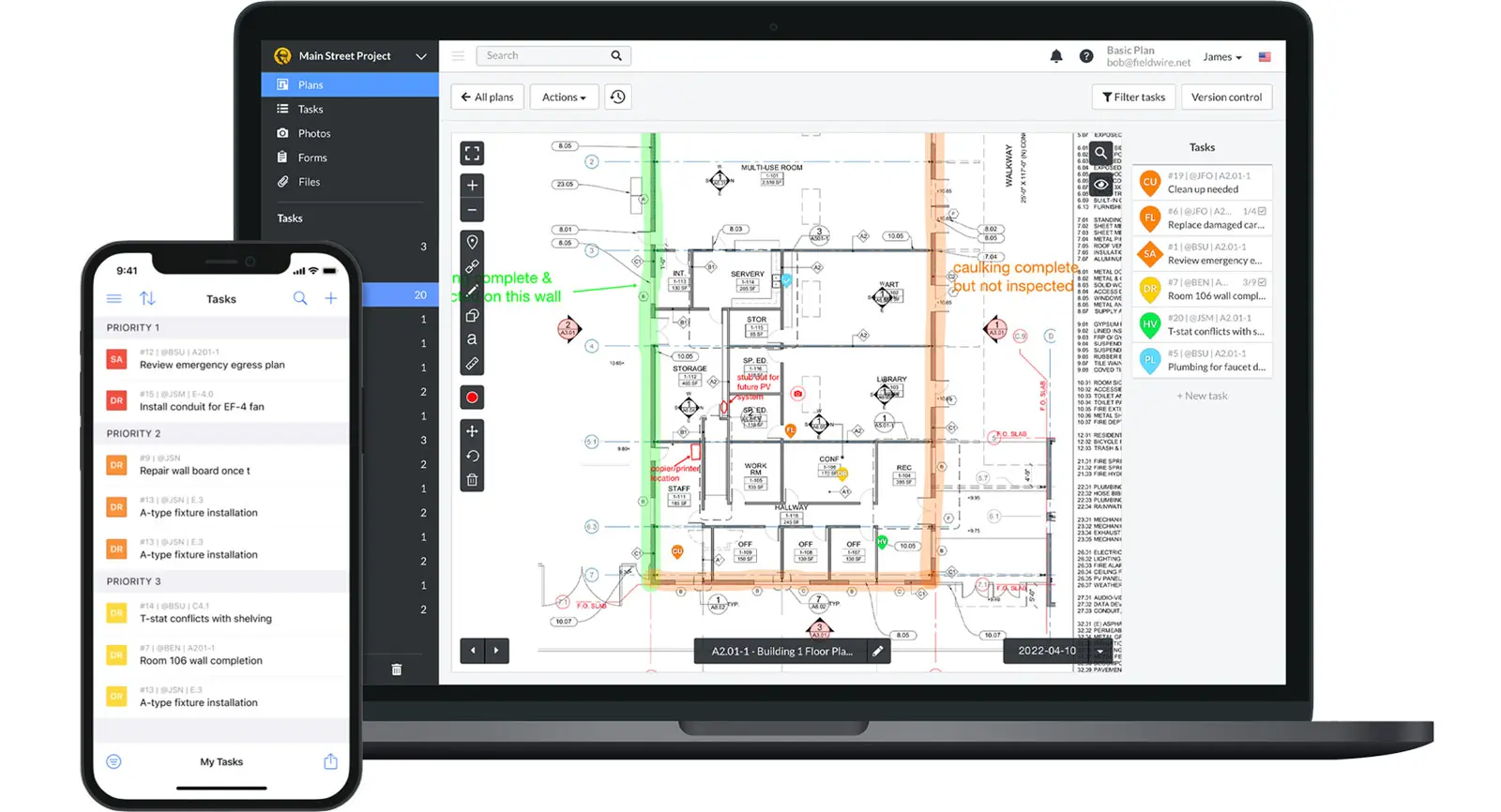
Best for: site teams and specialty contractors coordinating daily work and punch lists.
Drawbacks: less suited to formal document authoring of office financials.
Fieldwire is built for the field, with one of the faster blueprint viewers on site. You view plans, mark them up, pin tasks and punch items to a spot on the sheet, assign work and run a short lookahead schedule, then export reports for the office. It works offline and syncs when you reconnect, which suits low-signal sites.
PlanRadar
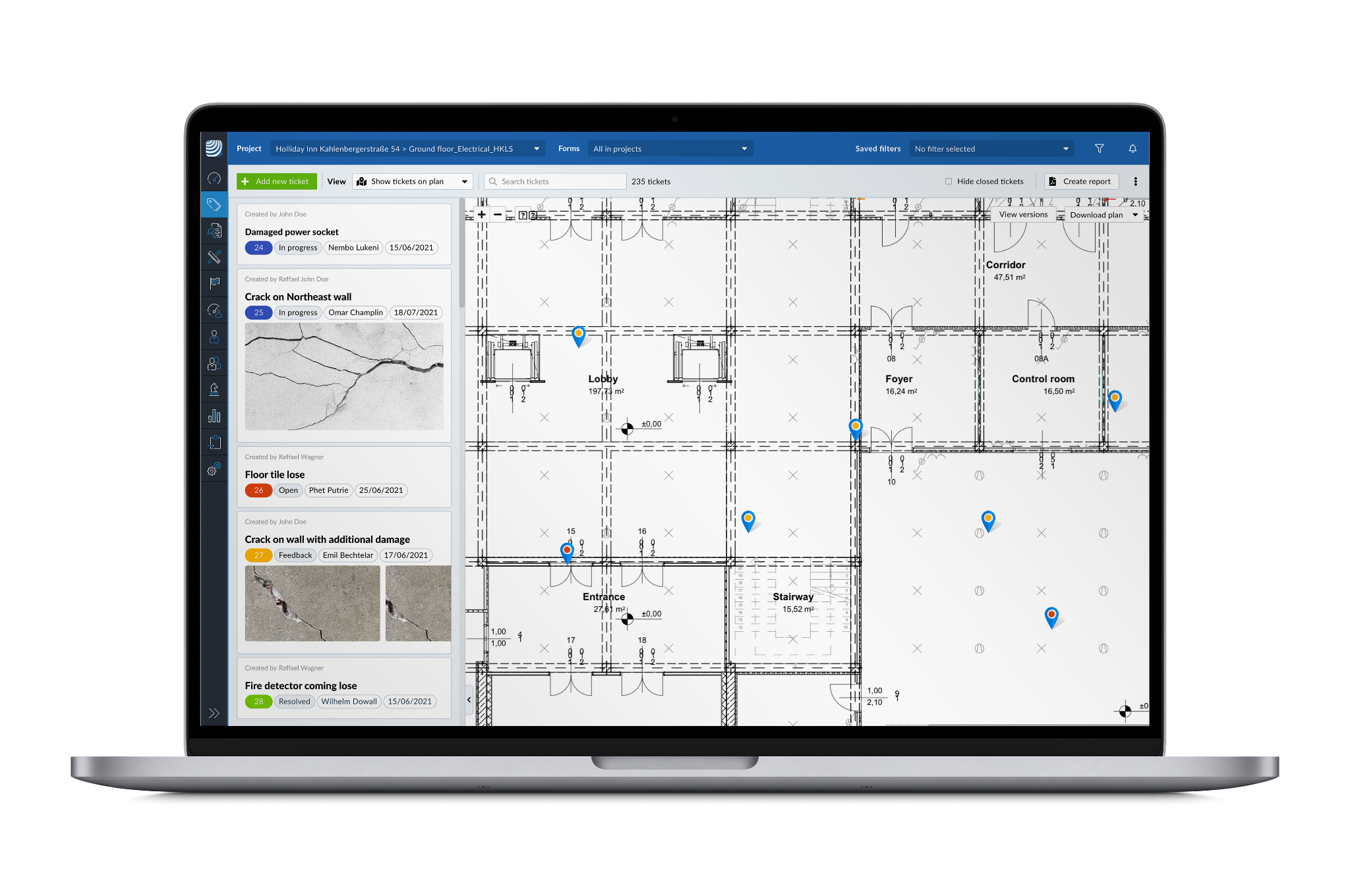
Best for: teams running formal defect, snagging, and inspection workflows.
Drawbacks: not a design or sketching tool, and not for financials.
Planradar is a field documentation platform built around tickets. You pin defects, tasks,a nd inspections into onto a 2D plan or BIM model, attach photos, video, or voice, and track each issue through to sign-off with an audit traill. Site diaries, checklists, and one-click PDF or Excel reports keep records defensible, and the mobile apps work fully offline. It is widely used across construction, facilities, and real estate.
Procore
Best for: larger contractors and complex projects that want one system for the whole job
Drawbacks: priced and built for large scale projects, not suited for individual projects and small teams.
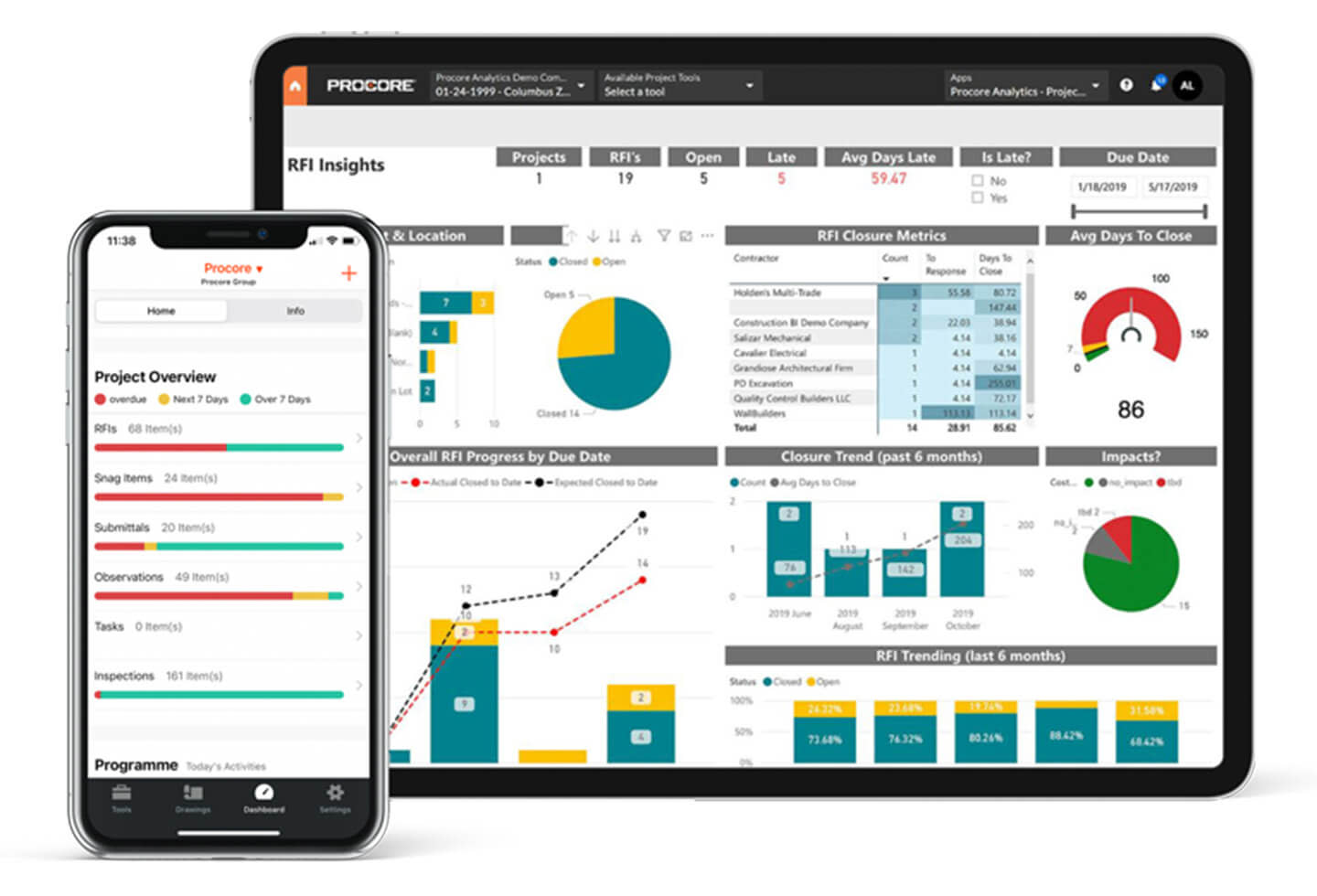
Procore is a comprehensive construction management platform that runs a job from preconstruction to closeout. Drawings, RFIs, submittals, punch lists, inspections, budgets, and daily logs all live in one place, and drawing sets link to the RFIs and punch items raised against them. Upload a set and Procore splits the pages and reads the sheet numbers so revisions slot into place, and new versions push to the field automatically. The mobile apps mirror the web for on-site updates.
Where Goodnotes fits
Most tools here control documents or run projects. Goodnotes handles the thinking around them.
On site that means sketching a section to show a contractor the problem, circling something on a PDF and writing a note beside it, or catching what was said in a meeting before it’s forgotten. Because Goodnotes is a field notebook first, the sketch, the markup, and the meeting notes all land in one file instead of three. AEC firms already work this way, as case studies show.
When you’re working offline on iPad and Mac, your notebooks are stored on the device, so they open and edit without a connection once they have synced. On Android, Windows, and web, Goodnotes is cloud-first, so open a document while you still have signal and it downloads for offline use, with recently used files kept ready. Field-built tools like Fieldwire and Bluebeam Cloud are more forgiving if you are regularly off-grid, so weigh that if constant connectivity is a problem.
It won’t replace Bluebeam for formal redlines or Procore for running a job. What it gives you is one home for the handwritten, sketched, quick-capture side of site work, the part that usually ends up on loose paper. See how teams use it across architecture, engineering and construction, and get started for free.
FAQ
What apps do AEC professionals use for on-site notes and markups?
It depends on the job. For formal markup and redlining, most teams use Bluebeam Revu, with Drawboard PDF as a lighter option. For field coordination and issue tracking, teams reach for Fieldwire, Procore, or PlanRadar. For handwritten notes, sketches, and quick PDF markup, Goodnotes and Morpholio Trace lead. Plenty of people run two together, one for the documents and one for their own notes.
What are the best digital tools for architects taking notes on-site in 2026?
For handwritten notes and sketching, Goodnotes and Morpholio Trace are the usual picks. Both handle pen input well and let you draw freely over pages and drawings. If your notes are mostly formal markups on construction documents, a dedicated tool like Bluebeam serves you better. Many architects carry both, one for thinking and sketching, one for document control.
Which tools let architects sketch and annotate on the same document?
Goodnotes and Morpholio Trace both do this. You write, draw, and annotate on the same page by hand, which suits early design thinking and site sketches. Morpholio leans toward design and overlays, while Goodnotes keeps those sketches next to your wider notes and PDFs. For measured, standardized markup on a drawing set, Bluebeam and Drawboard are the stronger pick.
Which tools are best for managing redlines on construction documents?
Bluebeam Revu is the standard for redlines and formal markup, with callouts, clouds, and measurement tools built for drawing sets. Drawboard PDF is a lighter alternative, and Drawboard Projects adds team review. Procore and Fieldwire fold markup into a wider project system. Goodnotes handles quick, informal markup and handwritten notes on a PDF, though it won't run a formal redline workflow.
What apps do civil engineers use for document review in the field?
For reviewing drawings and tracking issues on site, engineers lean on Fieldwire and Bluebeam, with Procore or PlanRadar where review needs to tie into wider project records. Many also keep Goodnotes alongside for their own field notes and sketches, marking up their own copies rather than driving the shared review.