


If you rely on a notebook or on loose leaf paper, misplacing your notes or spilling your coffee on them could mean losing them forever.
Digital notes, however, are much harder to lose — especially when you’re using Goodnotes, a note-taking app for the iPad.
From multiple backup options to a more secure way to sync notes to the cloud, there are several features we’ve implemented expressly to keep your digital notes secure and always ready whenever you need them.
Here’s how Goodnotes keeps your digital notes safe!
You can automatically back up files to Dropbox, OneDrive, or Google Drive
With auto-backup turned on, Goodnotes will save a copy of all your notes on the cloud, with Dropbox, Google Drive, or OneDrive.
Every time you make an edit to any document, Goodnotes will automatically replace that copy in your cloud storage, so that your documents are always up to date.
Tip: Because auto-backup creates copies of your notes online, if you choose to save them in PDF format, that also means you can view your Goodnotes notes on any computer. For example, you could use a Windows computer to view your Goodnotes documents from Google Drive.
You can manually back up your entire library to a hard drive
If you don’t use cloud storage, Goodnotes also gives you an alternate option to manually save a backup of your library.
You can back up your entire library and save it as a .zip file on a hard drive too, or anywhere you prefer (see here!).
So for example, if you hadn’t been using iCloud to sync your files and lost your iPad, you can easily re-import the backup to your new device to restore your library.
Deleted notes can be retrieved from the Trash Bin
If you accidentally delete a notebook or page, don’t worry. You can recover it from the Trash Bin.
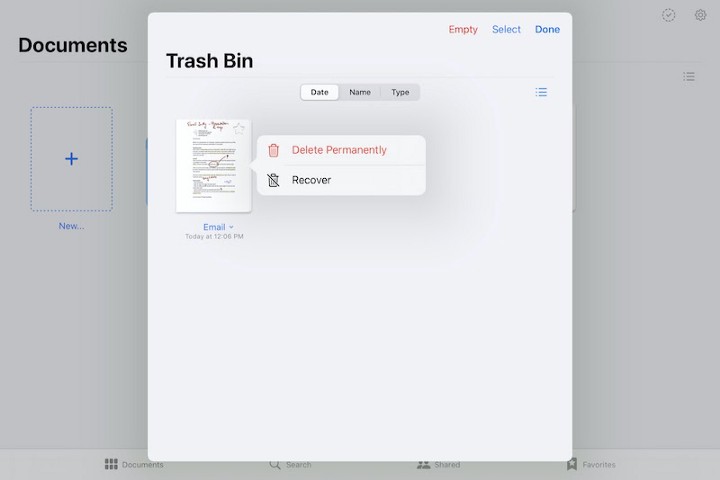
What’s more, Goodnotes won’t automatically empty your Trash Bin, so there’s no window in time that you have to recover a document by.
This means that if, for example, during your studies you wanted to refer to a note you deleted from a course last year, you can still find it in your Trash Bin.
Tip: While Goodnotes won’t delete any of your notes, you can easily delete them yourself.
Goodnotes uses a more stable and secure method of iCloud sync
We highly recommend enabling iCloud sync so that your notes are automatically saved to the cloud, and will be easily accessible on any iPad, iPhone, or Mac that shares your iCloud ID.
While most apps these days have iCloud sync, they aren’t all implemented the same way.
When we upgraded from GoodNotes 4 to GoodNotes 5, we adopted the latest CloudKit technology to power iCloud sync to have better control of the data sync and improve its stability.
As a result, this means:
- Even if you delete your Goodnotes data on iCloud, the notes on your iPad will be safe. Let’s say you’re trying to clear some space in your iCloud storage and accidentally delete your Goodnotes data — your notes are still safe. The next time you open Goodnotes, you’ll get the option to re-sync all your documents to the cloud or disable iCloud sync and simply keep your notes on your iPad.
- You won’t have to re-download all your notes from iCloud every time you open Goodnotes. Sometimes, when an iPad is low on storage, other apps may offload existing files onto iCloud in order to use less local storage. For example, if you have a large number of photos on your iPhone, you might’ve noticed that some of your old photos may need a second to re-download from iCloud when you tap them (which is inconvenient if you’re on the go and don’t have access to wifi). With Goodnotes, on the other hand, your notes are always at the ready.
- There’s a good chance we can track and recover “lost” documents. Because of the unique way we’ve set up iCloud sync, in the past we’ve been able to help our users recover backups of their libraries when they thought everything was lost — for example, in some rare cases where people couldn’t open Goodnotes due to crashes.
Start digital note-taking with the app that keeps your notes safe
With Goodnotes, all your documents are just a tap away on your iPad, Mac, and iPhone. Download today and unlock Goodnotes on all your devices.


.png)



