Can’t write or type fast enough to catch everything being said?
Then maybe just try hear them instead. Now, you can add audio recordings to your notebooks.
Audio that’s magically synced to the moment you write
Here’s how you can record audio alongside your note-taking:
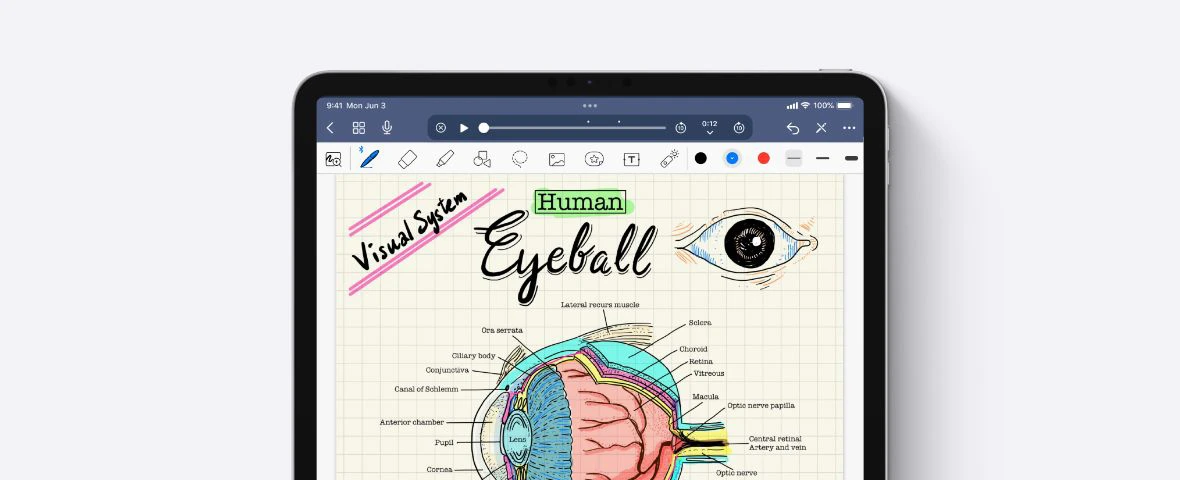
- Tap the mic icon at the top of the screen to start a new audio recording.
- Take notes as usual, and your typed or written notes will also be recorded as well.
- Play back the recording, and see your notes appear in sync with the audio.

Now, you can take light notes during lectures, meetings, or appointments and rely on the recording for more context later.
This allows you to be present and focus better on what’s being said in the moment.
When it’s time to review your notes, replay the audio, and fill in the gaps for anything you might’ve missed the first time around.
Easily jump to the right section
There are two ways to find the clip you need:
- Navigate your audio clips. Once you have at least one audio recording on a page, you’ll see the audio icon appear. That’s where you can navigate through and play all your recordings. Tap any audio clip to jump straight to that section of the recording.
- Long-press on a word or a note to find the audio recorded at that moment. This is perfect for the times where you need some more context on something you jotted down.
Capture more context with audio notes
With audio recording, Goodnotes is the only note-taking app you’ll ever need.
Use audio recording in Goodnotes and never miss a beat.